1. JdPlaySS protocol
1.1. Usage scenarios
Control the background music host over a network protocol. It supports LAN discovery of and control over the background music host and exposes local and scene music resources together with their controls, and is mainly used by Linux/RTOS gateways.
1.2. Overview
JdPlaySS is short for JdPlay Server Socket. Drawing on the ideas of the MQTT and DLNA protocols, it is a simple Server Socket based on the TCP protocol. It can be used for LAN background music system control on non-Android/iOS systems (such as Linux gateways) and supports several clients being connected at the same time.
1.3. Interaction diagram
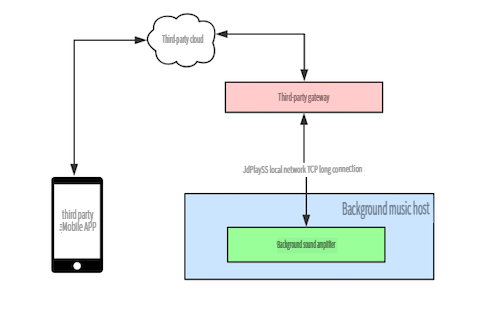
1.4. Conditions & constraints
The C/S data transfer format is JSON, and the newline character is used as the message separator. Actual newline characters are therefore not allowed inside a message, but escaped newline characters are.
1.5. Discovery protocol
Device discovery uses the standard mDNS protocol. Use the following commands to discover JdPlaySS devices; the service type is _jdplayss._tcp, the IP address of the JdPlaySS service is 192.168.1.67 and the port number is 8000
$ avahi-browse -a
+   eno1 IPv4 SmartSpeaker H7[1115]                         _jdplayss._tcp       local

$ avahi-browse -r _jdplayss._tcp
+   eno1 IPv4 SmartSpeaker H7[1115]                         _jdplayss._tcp       local
=   eno1 IPv4 SmartSpeaker H7[1115]                         _jdplayss._tcp       local
   hostname = [\040none\041.local]
   address = [192.168.1.67]
   port = [8000]
   txt = ["name=BGM-3588" "id=fe0064a3f0f2b5d73588"]
1.6. Control protocol
1.6.1. Message format
Data transfer between C and S uses the following fields. Note that seq=0 is reserved for unsolicited feedback from the server.
{
    "type": [int][required] control packet type,
    "seq": [int][optional] control packet sequence number,
    "s0": [string][optional] string parameter 0,
    "s1": [string][optional] string parameter 1,
    "i0": [int][optional] integer parameter 0,
    "i1": [int)[optional] integer parameter 1,
}
1.6.2. Message types
There are the following message packet types
| type value | transfer direction | description |
|---|---|---|
| 1 | C->S | CONNECT: connection request |
| 2 | S->C | CONNACK: connection response |
| 3 | C->S S->C |
PUBLISH: publish message |
| 4 | C->S S->C |
PUBACK: publish message acknowledgement |
| 12 | C->S | PINGREQ: heartbeat request |
| 13 | S->C | PINGRESP: heartbeat feedback |
| 14 | C->S | DISCONNECT: disconnection request |
1.6.3. Message descriptions
CONNECT
- i0: version client protocol version, this protocol is 1
- i1: keepalive heartbeat packet time in seconds, range (10~600 seconds), recommended value 300; the client sends one heartbeat packet or transmits data once every 240 seconds.
CONNACK
- i0: version server-side protocol version, this protocol is 1
- i1: 0: success -1: failure
- s0: the feedback message string, used for debugging
PUBLISH
Used for message passing between C and S. Two kinds of message are currently supported: control messages (C->S) and unsolicited status feedback messages (S->C). When the client sends a message to the server, the server replies with a PUBACK message; when the server sends feedback to the client on its own initiative, the client does not have to reply with a PUBACK message.
- seq: [required] message sequence number, incremented from 1 (0: reserved for messages sent on its own initiative by the server)
- i0: [required] cmd command, the supported commands and parameter settings are as follows.
| command value | command name | direction | function | request parameters | PubAck reply parameters |
|---|---|---|---|---|---|
| 100 | MEDIA_GET_METADATA | C->S | Get metadata | none | s0: see metadata |
| 101 | MEDIA_PLAY | C->S | Play | none | no parameters |
| 102 | MEDIA_PAUSE | C->S | Pause | none | no parameters |
| 103 | MEDIA_NEXT | C->S | Next track | none | no parameters |
| 104 | MEDIA_PREV | C->S | Previous track | none | no parameters |
| 105 | MEDIA_SEEK | C->S | Seek | i1: seek position, in seconds | no parameters |
| 106 | MEDIA_GET_POSITION | C->S | Get the playback position | none | s0: current time (seconds): total time (seconds) |
| 107 | MEDIA_SET_VOLUME | C->S | Set the volume | i1: volume value (0~100) | no parameters |
| 108 | MEDIA_GET_VOLUME | C->S | Get the volume | none | i1: volume value (0~100) |
| 109 | MEDIA_GET_ALL_LOCAL_MEDIA | C->S | Get the information of all local songs | none | s0: simple music metadata array |
| 111 | MEDIA_SWITCH_PLAY_MODE | C->S | Switch the playback mode; for radio-type content you are told that mode switching is not supported for radio | none | no parameters |
| 115 | MEDIA_GET_PLAY_MODE | C->S | Get the current playback mode | none | i1: playback mode 0: repeat all 1: repeat one 2: shuffle |
| 116 | MEDIA_PLAY_TTS | C->S | Play the TTS text as speech | s0: TTS text | no parameters |
| 118 | MEDIA_PLAY_HINT_PATH | C->S | Play a hint tone | s0: the full path of the hint tone | no parameters |
| 119 | MEDIA_GET_AUDIO_SOURCE | C->S | Get the current audio source | none | s0: the current audio source |
| 120 | MEDIA_SET_AUDIO_SOURCE | C->S | Switch the audio source | s0: target audio source | no parameters |
| 150 | MEDIA_REPORT_METADATA | S->C | Report the metadata | s0: see metadata | the client does not have to reply |
| 151 | MEDIA_REPORT_PlAY_STATE | S->C | Report the playback state | i1: playback state 0: paused 1: playing 2: buffering finished |
the client does not have to reply |
| 152 | MEDIA_REPORT_VOLUME | S->C | Report the volume | i1: volume value (0~100) | the client does not have to reply |
| 153 | MEDIA_REPORT_PLAY_MODE | S->C | Report the current playback mode | i1: playback mode 0: repeat all 1: repeat one 2: shuffle 3: sequential playback |
the client does not have to reply |
| 154 | MEDIA_REPORT_AUDIO_SOURCE | S->C | Report the current audio source | none | s0: current audio source sdcard: local bt: Bluetooth online: online auxin: external audio |
| 160 | MEDIA_GET_SONGLIST | S->C | Get a playlist | s0.type: json parameter of the requested songs 0: recently played list 1: my favourites 2: my playlists 100: current playlist |
s0: array of music or playlist metadata |
| 161 | MEDIA_PLAY_SONGLIST | C->S | Play a playlist | s0: music metadata i1: playback mode |
no parameters |
| 200 | DEVICE_POWER_ON | C->S | Turn the screen on | none | no parameters |
| 201 | DEVICE_POWER_OFF | C->S | Turn the screen off | none | no parameters |
| 202 | DEVICE_POWER_REBOOT | C->S | Reboot | none | no parameters |
| 203 | DEVICE_GET_POWER_STATUS | C->S | Get the power state | none | i1: 0 means powered off, 1 means powered on |
| 204 | DEVICE_GET_INFO | C->S | Get the device information | none | s0: Xiaoke host information uuid, name, version and so on |
Metadata
{
  "playState": 1,
  "singer": "Andy Lau",
  "songId": "548408",
  "songTitle": "Love You for Ten Thousand Years",
  "songUrl": "http://www.xxx.com/1.mp3",
  "volume": 80
}
Music metadata
{
  "songId": "548408",
  "songTitle": "Love You for Ten Thousand Years",
  "singer": "Andy Lau",
  "source": "migu",
  "type":2 //playlist or song type
}
PUBACK
- i0: the same as the PUBLISH cmd command value
- i1, s0: [optional], if a feedback message is needed
The reply parameters are as shown in the table above
PINGREQ
no parameters
PINGRESP
no parameters
DISCONNECT
no parameters
1.7. Integration & development
1.7.1. Client-side workflow
- Discover the background music host device through DLNA device discovery
- Establish a socket connection, TCP-connect to port 8000 of the device's IP address, start sending and receiving socket data, and use the newline character as the packet separator.
- Send the CONNECT request; sample data sent
{"type":1,"i0":1,"i1":240}
Wait for the server to report that the connection succeeded. Sample received data{"i0":1,"i1":0,"s0":"OK","seq":0,"type":2} - If the connection succeeded, send the PUBLISH/MEDIA_GET_METADATA request to obtain the metadata. Sample data sent
{"type":3,"i0":100,"seq":1} - Decide from the playback state whether to read the playback position periodically; if s0.playState=1, send the get-playback-position request, sample data sent
{"type":3,"i0":106,"seq":1} - The client has to send data to the server within the KeepAlive period in order to keep the long connection alive, otherwise the server times out and closes the connection on its own initiative. The client also has to check whether PINGREQ/PINGRESP messages or ACK messages are being received; if the client detects a problem with the communication link, it has to reconnect to the server.
- The receiving thread may hear messages about changes to the metadata, the playback state and the volume.
1.8. Testing & debugging methods
- Open "Settings > Network settings" in the background music system, check the IP address, and connect to the background music system with telnet
telnet ip address 8000
- Following the "Client-side workflow" above, test the interaction with commands in the telnet terminal
=> telnet 192.168.1.154 8000
Trying 192.168.1.154...
Connected to 192.168.1.154.
Escape character is '^]'.
{"type":1,"i0":1,"i1":240}
{"i0":1,"i1":0,"s0":"OK","seq":0,"type":2}
{"type":3,"i0":101,"seq":1}
{"i0":101,"i1":0,"seq":1,"type":4}
{"i0":150,"i1":0,"s0":"{\"playState\":0,\"singer\":\"Brooke White\",\"songId\":\"1552954\",\"songTitle\":\"Let It Be\",\"songUrl\":\"http://mr3.doubanio.com/87b89194e8858151bf1375eb17c96878/0/fm/song/p1552954_128k.mp3\",\"volume\":40}","seq":0,"type":3}
{"i0":151,"i1":2,"seq":0,"type":3}
{"type":3,"i0":102,"seq":1}
{"i0":151,"i1":0,"seq":0,"type":3}
{"i0":102,"i1":0,"seq":1,"type":4}
Send the "connection request" command
{"type":1,"i0":1,"i1":240}
The background music system returns
{"i0":1,"i1":0,"s0":"OK","seq":0,"type":2}
Send the "play" command
{"type":3,"i0":101,"seq":1}
The background music system returns
{"i0":101,"i1":0,"seq":1,"type":4}
{"i0":150,"i1":0,"s0":"{\"playState\":0,\"singer\":\"Brooke White\",\"songId\":\"1552954\",\"songTitle\":\"Let It Be\",\"songUrl\":\"http://mr3.doubanio.com/87b89194e8858151bf1375eb17c96878/0/fm/song/p1552954_128k.mp3\",\"volume\":40}","seq":0,"type":3}
{"i0":151,"i1":2,"seq":0,"type":3}
Send the "pause" command
{"type":3,"i0":102,"seq":1}
The background music system returns
{"i0":151,"i1":0,"seq":0,"type":3}
{"i0":102,"i1":0,"seq":1,"type":4}
1.9. Reference
1.9.1. Constant definitions
To keep the developer's workload down, the constants are defined as follows:
//JSSS protocol commands
#define CONNECT  1
#define CONNACK  2
#define PUBLISH  3
#define PUBACK  4
#define PINGREQ  12
#define PINGRESP  13
#define DISCONNECT  14

//JSSS protocol media control commands
#define MEDIA_GET_METADATA  100
#define MEDIA_PLAY  101
#define MEDIA_PAUSE  102
#define MEDIA_NEXT  103
#define MEDIA_PREV  104
#define MEDIA_SEEK  105
#define MEDIA_GET_POSITION  106
#define MEDIA_SET_VOLUME  107
#define MEDIA_GET_VOLUME  108
#define MEDIA_GET_ALL_LOCAL_MEDIA  109
#define MEDIA_PLAY_LOCAL_SONG  110
#define MEDIA_SWITCH_PLAY_MODE  111
#define MEDIA_GET_SCENE_MUSICS  112
#define MEDIA_PLAY_SCENE_MUSIC  113
#define MEDIA_PLAY_ONCE_LOCAL_SONG  114
#define MEDIA_GET_PLAY_MODE  115
#define MEDIA_PLAY_TTS  116
#define MEDIA_PLAY_HINT  117
#define MEDIA_PLAY_HINT_PATH  118
#define MEDIA_GET_AUDIO_SOURCE  119
#define MEDIA_SET_AUDIO_SOURCE  120

//JSSS protocol media status feedback commands
#define MEDIA_REPORT_METADATA  150
#define MEDIA_REPORT_PLAY_STATE  151
#define MEDIA_REPORT_VOLUME  152
#define MEDIA_REPORT_PLAY_MODE  153
#define MEDIA_REPORT_AUDIO_SOURCE  154
#define MEDIA_REPORT_PROGRESS  155

#define MEDIA_GET_SONGLIST 160
#define MEDIA_PLAY_SONGLIST 161

//JSSS protocol device control commands
#define DEVICE_POWER_ON  200
#define DEVICE_POWER_OFF  201
#define DEVICE_POWER_REBOOT  202
#define DEVICE_GET_POWER_STATUS  203
#define DEVICE_GET_INFO  204
1.9.2. Commonly used command examples
Connection command
telnet 10.0.0.26 8000
telnet 192.168.1.176 8000
{"type":1,"i0":109,"i1":240}
Get all local songs
{"type":3,"i0":109,"seq":1}
Play local songs
Note: before playing local songs you must first send the command that retrieves all local songs. s0: simple music metadata array, i1: index to start playback from
{"i0":110,"i1":0,"s0":"[{\"songId\":\"40\",\"songTitle\":\"DreamVillage_GuZheng-pre\"},{\"songId\":\"101\",\"songTitle\":\"A.I.N.Y.-[Love You]\"}]","seq":1,"type":3}
Play a single local song, without repeating the track
Note: s0 is a single music metadata json string here
{"i0":114,"i1":0,"s0":"{\"songId\":\"40\",\"songTitle\":\"DreamVillage_GuZheng-pre\"}","seq":1,"type":3}
Get the current audio source
Note: there are four values of the s0 parameter: sdcard local, bt Bluetooth, online online, auxin external audio
{"i0":119,"seq":1,"type":3}
{"i0":119,"i1":0,"s0":"sdcard","seq":1,"type":4}
Get my playlist list
{"i0":160,"i1":1,"seq":1,"type":3, "s0":"{\"type\":2}"}
Play a playlist
{"i0":161,"i1":1,"seq":1,"type":3,"s0":"{\"songTitle\":\"Test\",\"songId\":\"261aba01-760f-47\",\"singer\":\"\",\"source\":\"\",\"type\":2}"}
Get the current playlist
{"i0":160,"seq":1,"type":3, "s0":"{\"type\":100}"}
Play one song of the current playlist
Note: i1 is the number of the song to be played
{"i0":161,"i1":1,"seq":1,"type":3,"s0":"{\"type\":100}"}
Switch the audio source
Note: after switching to the local or the online audio source you have to send the play command before a song can be played
To play local songs, combine the 109 (get the local songs) and 110 (play a local song) commands above
To shuffle online songs at random, combine the 120 (switch to the online audio source) and 101 (play a song) commands
C -> S
{"i0":120,"s0":"online","seq":1,"type":3}
{"i0":120,"s0":"bt","seq":1,"type":3}
{"i0":120,"s0":"sdcard","seq":1,"type":3}
{"i0":120,"s0":"auxin","seq":1,"type":3}

S -> C
{"i0":120,"i1":0,"seq":1,"type":4}
an i1 value of 0 means the audio source was switched successfully, -1 means switching the audio source failed
Play
{"i0":101,"seq":1,"type":3}
Get the metadata of the current music
C -> S
{"type":3,"i0":100,"seq":1}

S -> C
{"i0":100,"i1":0,"s0":"{\"playState\":1,\"singer\":\"Harry Styles\",\"songId\":\"003luGpS16qZgi\",\"songTitle\":\"Sweet Creature\",\"songUrl\":\"http://dl.stream.qqmusic.qq.com/C400003luGpS16qZgi.m4a?vkey=E3EDE3145DFD5364AA8DE7315B218A9A963C25BA76AD47D7760486319CB9A3980125E46BD1A19BF0FBC94D2099B32DD27B0B104FF236EBE5&guid=5358354936&fromtag=30\",\"volume\":7}","seq":1,"type":4}
Switch the playback mode
{"type":3,"i0":111,"seq":4}
1.10. FAQ
E: the turn-screen-on/turn-screen-off operations only apply to devices with a screen
Q: why does the server-side socket connection close on its own initiative
A: please check whether a PING or PUBLISH command was sent within the KeepAlive period
Q: why is the client unable to publish a message
A: please check whether the seq field is set to a non-zero value and is being incremented actively
Q: testing on Windows with PuTTY
A:
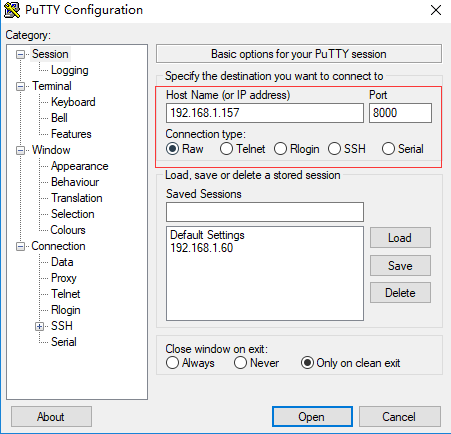
Send the connection request{"type":1,"i0":1,"i1":240}
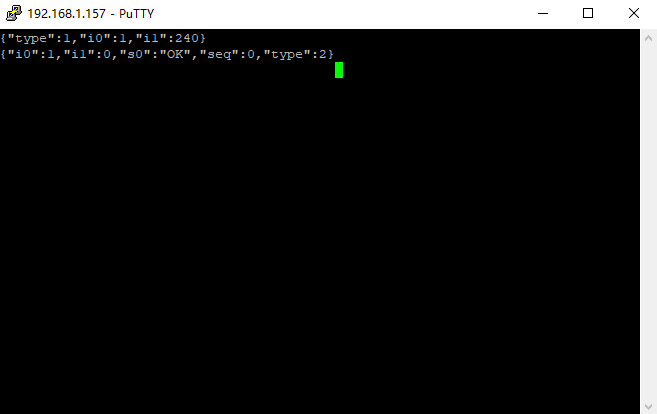
Q: strategy for obtaining the information of the currently playing song
A: once the socket is connected you only have to send the MEDIA_GET_METADATA command once to obtain the information of the currently playing song. As long as the socket connection stays open, the song information is reported actively through MEDIA_REPORT_PlAY_STATE from then on.
Q: which newline character should be used
A: the newline character is \n throughout
Q: how do I get the device ID of the Xiaoke host
A: when the device is discovered, the notify packet contains the device ID
Q: what playback modes are there
A:
- 0 repeat all REPEAT_ALL
- 1 repeat one REPEAT_ONE
- 2 shuffle SHUFFLE
- 3 sequential playback ORDER
Q: changes to which information are reported by the server on its own initiative
A: once the song, volume, playback state or playback mode changes on the Xiaoke host, the new state is reported on its own initiative
Q: how do I get the playback progress
A: for the current playback progress, C has to query S actively, command: MEDIA_GET_POSITION
Q: the client sends an M-SEARCH packet but the server does not answer right away
A: SSDP packets are multicast packets and may therefore be lost. Each time you send a search packet you can send several
Q: if the network is poor, when does Xiaoke close the connection on its own initiative, and is there a reconnection mechanism
A: in JSSS Xiaoke acts as the server and does not decide to disconnect based on the network conditions. It does reconnect: the client has to send data to the server within the KeepAlive period to keep the long connection alive, otherwise the server times out and closes the connection on its own initiative. The client also has to check whether PINGREQ/PINGRESP messages or ACK messages are being received; if the client detects a problem with the communication link, it has to reconnect to the server.